Unlock the full social potential of Roblox by mastering its chat features a crucial skill for busy adult gamers who juggle work family and play. This comprehensive guide helps you understand how to enable chat navigate safety settings use voice and text options and troubleshoot common communication issues. As 87 percent of US gamers play regularly averaging over 10 hours per week and mobile gaming continues its dominance connecting with friends and fellow players in virtual worlds like Roblox is more important than ever. Whether you are looking to coordinate in a challenging game build social connections or simply unwind this article provides practical actionable advice to enhance your Roblox experience. We dive into the latest trends balancing gaming with real life and optimizing your in game interactions without the typical gaming hype. Discover how to chat smart and safely making your Roblox time more enjoyable and productive.
Q: How do I enable chat for my Roblox account?
A: To enable chat, log into your Roblox account, go to Settings, then Privacy. Under 'Who can chat with me in app or in game', select 'Friends' or 'Everyone'. For full chat functionality, your account generally needs to be age-verified as 13 or older.
Q: What are the primary safety features for Roblox chat?
A: Roblox implements robust filtering systems that block inappropriate content and personal information. They also have age-based restrictions, human moderation of reported content, and an easy-to-use in-game reporting tool to ensure a safer communication environment for all users.
Q: Can adults use voice chat in Roblox?
A: Yes, adults and users aged 13 and older can use voice chat in Roblox after completing an age verification process using a government-issued ID. Once verified, enable voice chat in your Privacy settings, and it will be available in supported experiences.
Q: How do I report a player for inappropriate chat in Roblox?
A: To report inappropriate chat, click on the player's avatar or chat message in-game, then select 'Report' or 'Report Abuse'. Choose the relevant reason for the report and provide details. Roblox's moderation team will review and take action.
Q: Why is my chat not showing up or heavily filtered in Roblox?
A: If your chat isn't showing or is heavily filtered, it's likely due to your account's age setting (under 13 has strict filters), parental controls, or privacy settings that restrict communication. Check your Privacy settings and ensure your age is verified for broader chat access.
Q: What are the benefits of using Discord for Roblox communication?
A: Discord offers superior organization for group communication, allowing dedicated voice and text channels for specific games or friends. It provides more robust features for strategy coordination and social interaction outside of Roblox, making it ideal for adult gamers balancing life and play.
Q: Where can I find the official Roblox chat rules and guidelines?
A: You can find the official Roblox chat rules and guidelines on the Roblox Community Rules page, accessible through the main Roblox website. It's recommended to check this page regularly, along with the official Roblox Blog, for updates on policies and features.
For many adult gamers balancing a demanding job family life and personal commitments finding time for relaxation and connection through gaming is a true balancing act. When you finally carve out those precious hours to jump into a world like Roblox, the last thing you want is to struggle with basic communication. Social play is a huge draw with 87 percent of US gamers regularly engaging and many dedicating 10 plus hours a week to their favorite titles. Communication is the backbone of this social experience whether you are coordinating a strategy with friends in a tycoon game or simply sharing a laugh in a virtual hangout. Mobile gaming continues its upward trajectory making seamless communication across devices even more critical.
This guide is crafted for you the busy adult gamer who values efficiency clear solutions and a straightforward path to enjoying your gaming time. We will walk through everything you need to know about how to chat in Roblox ensuring you can connect with confidence. From enabling chat to understanding robust safety features and even troubleshooting common hiccups, we will cover it all so you can focus on the fun and skill building that Roblox offers. Let's dive in and unlock a more connected and enjoyable Roblox experience.
How Do I Enable Chat in Roblox for My Account
Enabling chat in Roblox is typically straightforward but requires specific account settings to be configured correctly. For adult gamers managing their own accounts you will need to access your Privacy Settings. Log into your Roblox account on the website or through the app. Navigate to the Settings icon usually a gear symbol. From there select Privacy. In the Communication section look for the 'Who can chat with me in app or in game' option. Ensure this is set to 'Friends' or 'Everyone' depending on your preference. If you are unable to adjust this it might be due to your account's age settings or parental controls.
For accounts verified as 13 years old and older, more chat options including free text chat are available. Younger accounts have restricted chat features, often limited to pre-approved phrases. This age gating is a core safety feature designed to protect younger players while still allowing older users a fuller social experience. Always double check your account's verified age as it dictates the range of chat options you can access. This step is fundamental to unlocking your ability to communicate freely within Roblox experiences.
What Are the Different Types of Chat Available in Roblox
Roblox offers a couple of distinct ways to communicate catering to different ages and preferences. The primary forms are text chat and voice chat. Text chat is the most common allowing players to type messages to each other within games or through private messages. For accounts under 13 text chat is heavily filtered, often limited to an approved whitelist of words and phrases to prevent the sharing of personal information or inappropriate content. Accounts 13 and older have a less restrictive filter, enabling more natural conversation while still adhering to Roblox's community standards.
Voice chat introduced more recently has revolutionized communication for many adult players. This feature allows real time audio conversations within supported experiences adding a new layer of immersion and social interaction. Beyond these in game methods Roblox also has a friend messaging system accessible outside of specific game experiences. This allows players to send private text messages to their friends much like a direct messaging app providing a persistent way to communicate even when not in the same game.
How Can Parents Manage Chat Settings for Younger Players on Roblox
Managing chat settings for younger family members on Roblox is a top priority for many parents, especially given the platform's vast social elements. Roblox provides robust parental controls accessible through the account settings. Parents can log into their child's account and navigate to the Privacy section. Here, they can restrict who can chat with their child, ranging from 'No One' to 'Friends' or 'Everyone' (for 13+ accounts).
Crucially parents can enable Account Restrictions which disables all social features including chat and private messaging preventing any in game communication. They can also review chat logs to monitor conversations although this feature varies by region and specific account settings. It is vital for parents to regularly check these settings and have open conversations with their children about online safety. This proactive approach ensures a safe and controlled environment for younger gamers to enjoy Roblox without exposure to unwanted interactions.
What Safety Features Does Roblox Offer for Chat Communication
Roblox prioritizes player safety with a multi faceted approach to chat communication. At its core is a sophisticated filtering system that automatically detects and blocks inappropriate content personal information and certain offensive language across all chat types. This filter is constantly updated to adapt to new slang and evolving safety challenges ensuring a dynamic layer of protection.
Beyond filtering, Roblox employs human moderators who review reported content and accounts. Players can easily report any user or chat message that violates community standards directly within the game interface. This reporting system is a critical tool empowering players to help maintain a positive environment. Additionally the age based chat restrictions mentioned earlier ensure that younger players have more limited and safer communication options protecting them from potentially harmful interactions. Roblox's goal is to create a fun and safe metaverse where social interaction can thrive responsibly.
Can I Use Voice Chat in Roblox and How Does It Work
Yes voice chat is a feature available to Roblox users aged 13 and older who have verified their age. To enable voice chat you first need to complete age verification through Roblox's identity verification process which typically involves uploading a photo of your government issued ID. Once verified navigate to your Privacy settings and toggle on 'Enable Voice Chat'.
Voice chat is available in experiences that have enabled it. When you join a supported game you will see a microphone icon next to your avatar. Clicking this icon will mute or unmute your microphone. The feature uses spatial audio meaning the voices of players closer to your avatar will sound louder allowing for more immersive and realistic interactions. This adds a fantastic layer of social depth, making coordination in team based games or casual conversations in social hubs much more engaging for adult gamers who enjoy a more direct form of communication.
How Do I Report Inappropriate Chat Behavior in Roblox
Reporting inappropriate chat behavior in Roblox is essential for maintaining a positive and safe community environment. If you encounter any chat that violates Roblox's Community Standards, whether it's harassment bullying or sharing of personal information, you can report it directly within the game. To do this, locate the chat message or the player's avatar. Click on the three dots icon or the player's name to open their profile or a context menu. Within this menu you should find a 'Report' or 'Report Abuse' option.
Follow the prompts, selecting the specific reason for the report (e.g., inappropriate chat, bullying). Provide as much detail as possible. Roblox's moderation team will review the report and take appropriate action which can range from warnings to temporary or permanent bans. Remember your reports are crucial in helping Roblox keep its platform safe for everyone especially as social gaming continues to be a dominant trend, with gamers seeking enjoyable and respectful online spaces.
What Are Common Chat Issues in Roblox and How Can I Fix Them
Even with the best intentions chat in Roblox can sometimes hit a snag. One common issue is chat not appearing or being heavily filtered. This often stems from incorrect privacy settings, an unverified age, or active parental controls. Double check your account's Privacy settings to ensure 'Who can chat with me' is set to your preference and confirm your age is verified for broader chat access. If you are experiencing issues with voice chat, ensure it's enabled in your Privacy settings and that the specific game supports it. Also check your device's microphone settings and permissions for Roblox.
Another frequent problem involves chat messages not sending or appearing to others. This could be due to a poor internet connection, a temporary Roblox server issue, or inadvertently including filtered words. Try restarting your game or client. If the problem persists, check Roblox's status page for server issues. Sometimes, certain words or phrases, even innocuous ones, might trigger the filter; try rephrasing your message. Lastly, ensure your Roblox client is up to date, as outdated versions can sometimes cause communication glitches.
How Do I Chat Effectively with Friends and Groups in Roblox Games
Effective communication with friends and groups in Roblox can significantly enhance your gaming experience. The simplest way is through the in game chat window. Press the forward slash / key to open the chat box, type your message, and press Enter. If you are in a group or team specific game, your messages will often be visible to your teammates. For private conversations with friends, you can use the private message feature outside of games or try to coordinate in specific game instances.
For more organized group play, especially for adult gamers coordinating strategies, many groups use external communication platforms like Discord alongside Roblox. This allows for more extensive voice chat and text channels, perfect for planning and real time tactical discussions. Leveraging a combination of in game chat for quick messages and external tools for deeper engagement can provide the best of both worlds, ensuring smooth collaboration and social interaction that fits into your busy schedule.
Are There Any Third Party Tools or Methods for Roblox Communication
While Roblox provides robust in game and platform based communication options, many adult gamers find value in integrating third party tools, primarily for voice and organized text chat. Discord is by far the most popular external platform. It allows for dedicated servers with multiple voice and text channels, perfect for gaming communities, specific Roblox groups, or just a circle of friends. You can set up channels for different games, roles, or topics, making coordination incredibly efficient. This is particularly useful for complex games requiring real-time strategy or for maintaining social connections outside of Roblox itself.
Other tools like TeamSpeak or Mumble offer similar functionalities, though Discord's user friendliness and extensive features have made it the go-to for most gamers. When using third party tools, always be mindful of online safety and privacy. Only join trusted servers and be cautious about sharing personal information. These tools can greatly enhance your social gaming experience, allowing you to build stronger connections and better coordinate your play sessions, especially when balancing gaming with a busy life schedule.
How Can I Stay Updated on Roblox Chat Policy Changes
Roblox regularly updates its community standards and chat policies to adapt to new online safety challenges and improve user experience. Staying informed about these changes is crucial for all players, especially those managing accounts for younger family members. The best way to stay updated is by regularly visiting the official Roblox Blog and the Roblox Community Rules page. These resources are where Roblox announces significant updates to its platform features, safety protocols, and moderation guidelines.
Additionally, following Roblox's official social media channels can provide quick notifications about policy changes or new features. Many dedicated Roblox community forums and fan sites also disseminate this information, often with discussions that can provide further context. By staying proactive and informed, you ensure that you are always operating within the latest guidelines, maintaining a safe and enjoyable chat experience for yourself and those you interact with on the platform. This proactive approach helps adult gamers keep up with trends without needing to sift through endless gaming hype.
Conclusion: Connect, Play, and Enjoy Roblox Safely
Mastering Roblox chat is about more than just typing messages; it's about connecting with friends, building communities, and fully immersing yourself in the vast worlds Roblox offers. For adult gamers who crave relaxation and social interaction, understanding these features ensures your gaming time is well spent and rewarding. With robust safety features, flexible communication options, and the power to report issues, you can navigate Roblox's social landscape with confidence. Remember that 87 percent of US gamers play regularly, often for 10 plus hours weekly, highlighting the importance of seamless and safe social interaction.
By following this guide, you are now equipped to enable chat, leverage voice communication, set up parental controls, and troubleshoot common problems, making your Roblox journey smoother and more enjoyable. Embrace the social side of gaming and make the most of your virtual adventures.
What's your biggest Roblox communication challenge? Comment below and share your tips!
FAQ Section: Quick Answers to Your Roblox Chat Questions
Is Roblox chat really safe for all ages
Roblox chat is designed with safety in mind featuring strong filters and age based restrictions. Accounts under 13 have highly restricted chat to predetermined phrases. While Roblox strives for safety, parental supervision and guidance are always recommended especially for younger players.
Why is my Roblox chat filtered so much
Your Roblox chat might be heavily filtered if your account is set to under 13 years old. This is a safety measure to protect younger players by preventing the sharing of personal information or inappropriate content. Verifying your age to 13 or older can loosen these restrictions.
Can I turn off chat completely in Roblox
Yes you can turn off chat completely in Roblox. Navigate to your Privacy settings and adjust 'Who can chat with me in app or in game' to 'No One'. Parents can also use Account Restrictions for a complete social feature lockdown on a child's account.
How do I know if a game supports Roblox voice chat
Games that support Roblox voice chat will typically display a microphone icon next to your avatar or have indicators within the game's UI. You must also have your age verified to 13 or older and voice chat enabled in your privacy settings to use it.
What should I do if my microphone isn't working with Roblox voice chat
First check your device's system microphone settings and ensure Roblox has permission to access it. Then verify that voice chat is enabled in your Roblox Privacy settings. Also confirm the specific game supports voice chat and try restarting Roblox or your device.
Does Roblox monitor all chat conversations
Roblox uses an advanced filtering system for all chat and actively moderates content through player reports. While direct human monitoring of every conversation is not feasible, the system is designed to detect and address violations of its Community Standards proactively.
How often are Roblox chat policies updated
Roblox chat policies and community standards are updated regularly to respond to new online safety challenges and user feedback. It is advisable to check the official Roblox Blog and Community Rules page periodically to stay informed about the latest changes.
Enable Roblox Chat Manage Privacy Settings Use Voice and Text Chat Report Inappropriate Behavior Troubleshoot Chat Issues Parental Controls for Roblox Chat Roblox Social Features
35


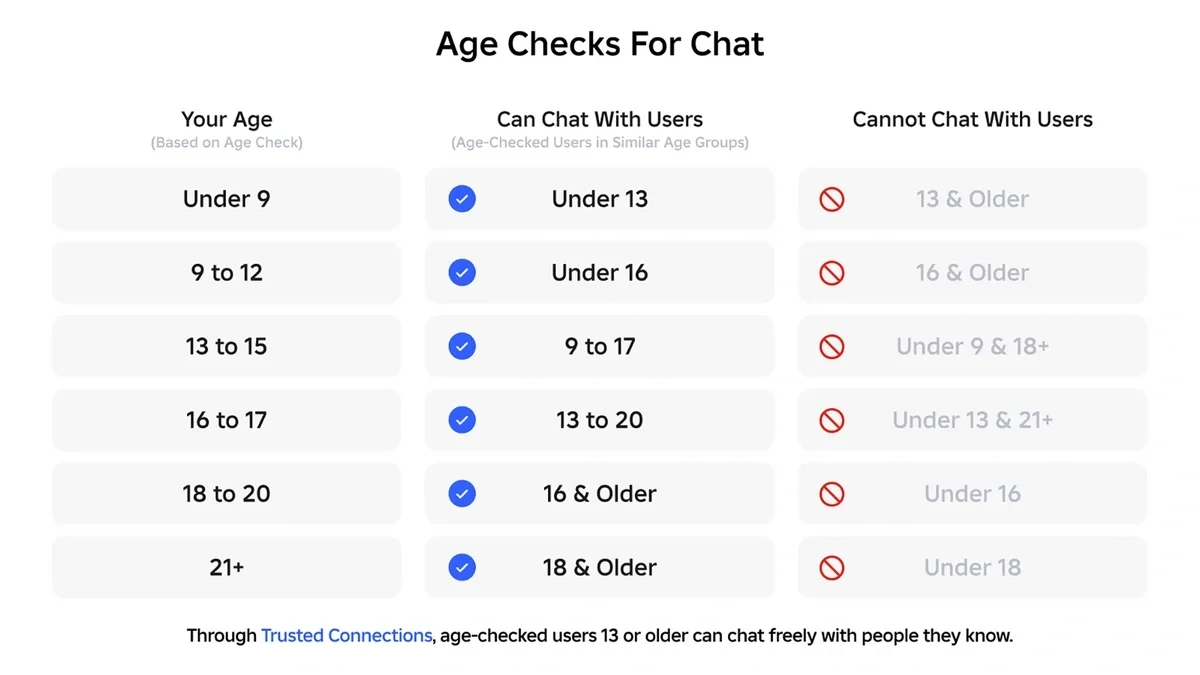
Roblox S New Chat Rules Explained January 2026 Roblox New Chat Rules . How To Message On Roblox 2026 A Quick Guide . How To Get Voice Chat On Roblox 2026 YouTube . How To Make A System Chat Message Using The New . Roblox S New Chat Rules Explained January 2026 Image 827


How To Get Voice Chat On Roblox 2026 Enable VC Without ID Izoate How To Enable Voice Chat In Roblox 2026.webp. How To Get Voice Chat On Roblox 2026 Step By Step Get ROBLOX . How To GET VOICE CHAT On Roblox 2026 YouTube . Roblox Chat Update 2026 Explained Mandatory Age New Roblox Chat Update 2026. How To Get Voice Chat On Roblox 2026 Roblox Desk How To Get Voice Chat On Roblox In 2026.webp
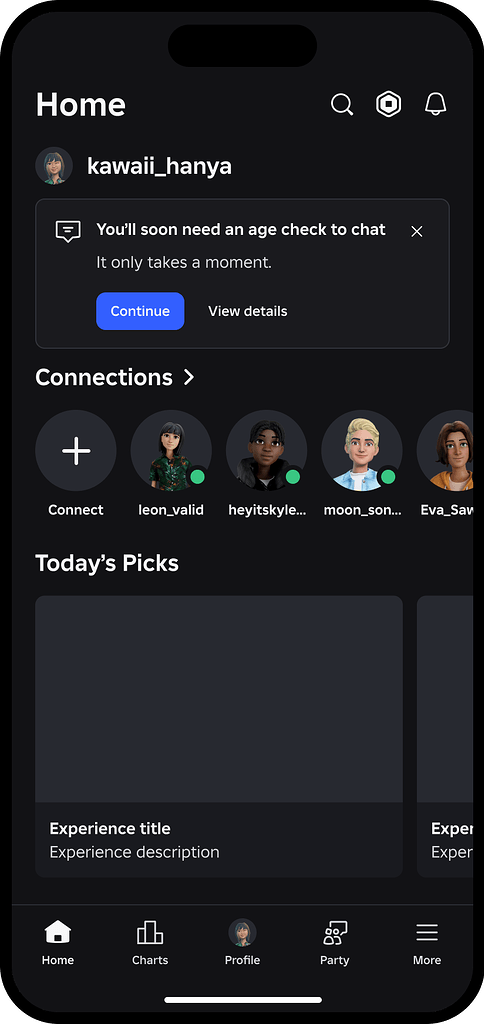



Test Encouraging Users To Complete An Age Check To Chat Page 85 2 484x1024 . Roblox Gift Cards Removed From Microsoft Rewards 2026 Roblox Voice Chat Settings . How To Get Voice Chat On Roblox 2026 WITHOUT ID Full Guide YouTube . Can 17 Year Olds Use Voice Chat On Roblox Today PC Mobile How To Get Voice Chat On Roblox . Roblox Chat Rooms Your Guide To Connecting Amp Chat



Roblox Age New Chat Rules Child Safety Updates World En Age Check Flow 1 . How To Message On Roblox 2026 A Quick Guide Private Chat In Roblox Step 11 . How To Message On Roblox 2026 A Quick Guide . How To Message On Roblox 2026 A Quick Guide . How To Get Trusted Connections In Roblox 2026 Full Tutorial Roblox Trusted


How To Message On Roblox 2026 A Quick Guide . How To Message On Roblox 2026 A Quick Guide SL1500 . Roblox Chat Off How Do I Do It For 2026 . How To Unlock Chat In Roblox 2026 How To Verify Age In Roblox Mobile . How To Message On Roblox 2026 A Quick Guide


How To UNLOCK CHAT In ROBLOX 2026 How To Open Chat In Roblox Easily . Turn On Voice Chat In Roblox How To USE Voice Chat In Roblox IPad . How To Manage Your Child S And Chat Settings Roblox. How To Message On Roblox 2026 A Quick Guide . How To PM On Roblox Your 2026 Guide To Direct Messaging Dc16406f 9d07 44f6 B2a3


Roblox Chat Off How Do I Do It For 2026 How Turn Off Safe Chat Roblox 1536x1024 . How To Message On Roblox 2026 A Quick Guide . Roblox Age Chat March 2026 KreekCraft S Warning Roblox Age Chat . How Do You Pronounce Roblox Correctly For 2026 1200x1769 . How To Get Voice Chat On Roblox FREE 2026 UPDATED YouTube